

Workflows
A workflow decides how a project gets its work done, alone or with helpers that plan, check or follow up.
A workflow is the way a project works. Every project has one, even if it is simply "you ask, the project does it". A workflow can add helpers around the project: a critic that checks each draft, a planner that writes the approach first, or follow-up jobs that run after each piece of work.
To set one up step by step, follow the Workflows tutorial.
The seven ways of working
| Way of working | Good for | What it adds |
|---|---|---|
| One project that figures it out | Questions that need some digging before they can be answered. | Nothing extra. The project is told to check what it finds before it answers. |
| Plan first, then do it | Work you want to approve before it starts. | Two tasks: one writes a plan you can read, the other carries it out. |
| A front desk for specialists | Requests that vary, each suited to a different helper. | Two or more helpers. The project hands each request to the right one. |
| A lead who splits up the work | A big goal that breaks into parts. | Two or more helpers. The project hands out the parts and puts the results together. |
| A project with follow-ups | Jobs that come after every piece of work, such as updating an index. | One or more follow-up tasks that run in turn when the project finishes. |
| Keep something up to date | Work that should follow a folder or a shared spreadsheet as it changes. | A watch on a folder or a connection, and tasks that fold each change in. |
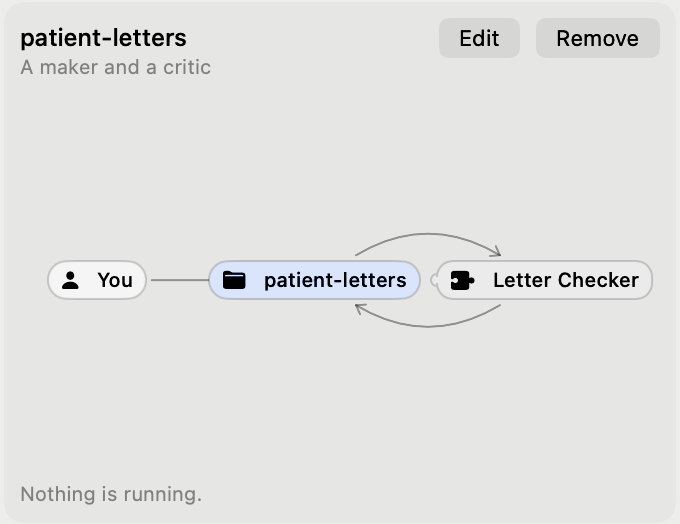
| A maker and a critic | Work that must meet clear rules before anyone sees it. | A critic that checks each draft until it approves. |
What a workflow sets up
Behind the scenes, each helper is an ordinary Project Task. After the wizard, you can see and change them like any other task. The wizard also gives the project a short brief about how to work with its helpers, which it reads at the start of each conversation.
You can describe what the project is for at the top of step 2 of the wizard, for example "the letters we send to patients". The wizard uses it to write better instructions for the helpers.
A project has one workflow at a time. Saving a new one replaces the old one and removes the tasks it made. Tasks you made yourself are kept.
See how a project works
Open Workspace Information in the right panel. Under How Projects Work, each project with a workflow shows a small picture of it, with what is running right now.
Workflows and templates
A template is a single ready-made job, such as "Report what changed" in a spreadsheet. It adds Project Tasks without touching the project's workflow, so you can add as many as you like. Choose New from a Template… from the + menu on the Project Ribbon.
A workflow is the project's whole way of working. There is only one at a time.
Something unclear or out of date? Tell us and we will fix it.